




Android Hardening Guide
A step-by-step configuration reference for reducing your Android device’s digital exposure. Each setting reflects best practices for principals, family members, and anyone in a high-visibility role.
Download Guide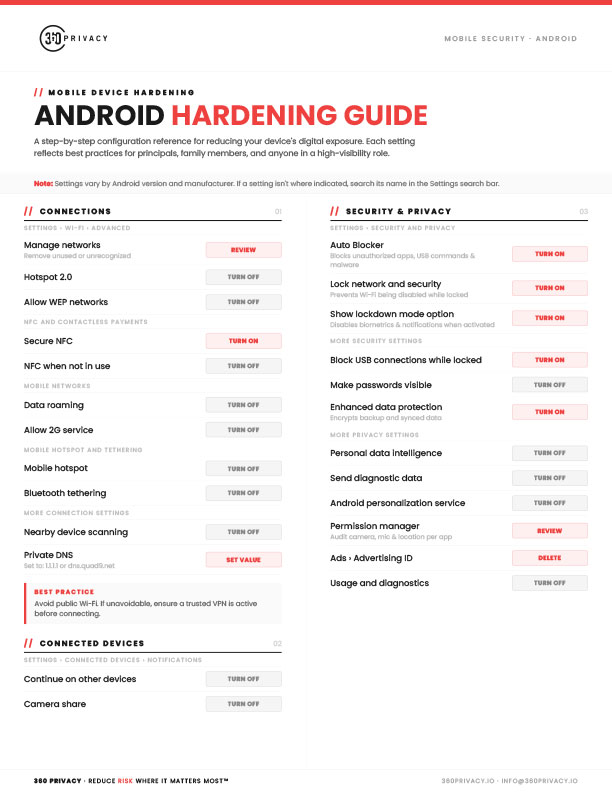
Summary
The 360 Privacy Android Hardening Guide is a free two-page checklist covering the Android settings that matter most for security and privacy. It starts with connections, including Wi-Fi network cleanup, Secure NFC, disabling 2G and data roaming, and setting a private DNS, then covers lock screen protections like hidden notifications, instant auto-lock, and blocking USB connections while locked. Security features such as Auto Blocker, lockdown mode, Enhanced Data Protection, and unknown tracker alerts are included alongside privacy controls for diagnostics, personalization, the advertising ID, and per-app camera, mic, and location permissions. It also walks through Google account settings, theft protection and remote lock, and limiting Gemini AI access while the phone is locked. Each setting lists a clear action to take, with notes for finding settings that vary by Android version and manufacturer.
Download the full guide here:
Download GuideShare this
More Resources
Reports
2026 Annual Digital Exposure Report
The people with the most to protect are often the easiest to find.
Guide
iPhone Hardening Guide
A step-by-step configuration reference for reducing your device's digital exposure. Each setting reflects best practices for principals, family members, and anyone in a high-visibility role.
Guide
Windows Hardening Guide
A step-by-step configuration reference for reducing your Windows desktop’s digital exposure. Each setting reflects best practices for principals, family members, and anyone in a high-visibility role.