




Windows Hardening Guide
A step-by-step configuration reference for reducing your Windows desktop’s digital exposure. Each setting reflects best practices for principals, family members, and anyone in a high-visibility role.
Download Guide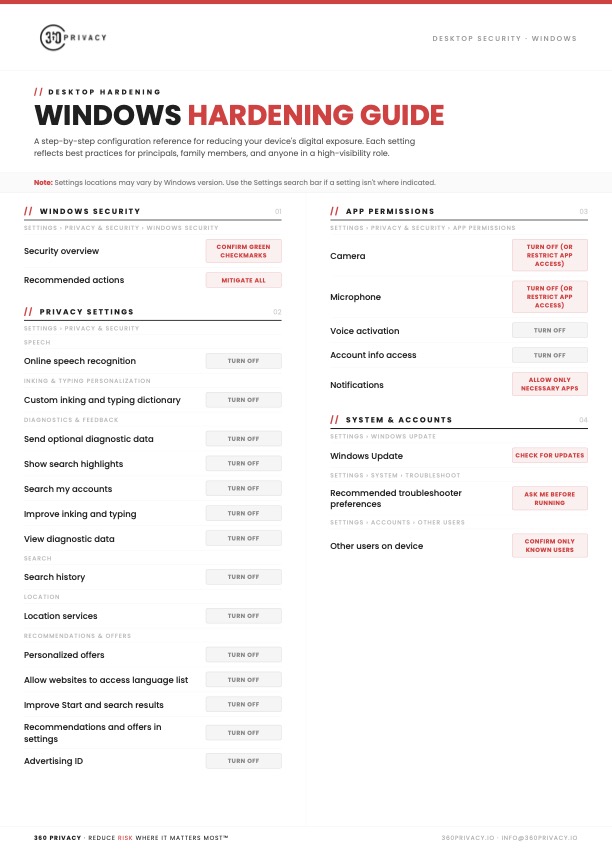
Summary
The 360 Privacy Windows Hardening Guide is a free one-page checklist covering the Windows settings that matter most for security and privacy. It starts with Windows Security, making sure every check is green and recommended actions are resolved, then moves through privacy controls like online speech recognition, diagnostic data, search history, location services, and the advertising ID. It also covers app permissions for the camera, microphone, voice activation, and notifications, along with system and account basics such as Windows Update, troubleshooter settings, and confirming only known users have access to the device. Each setting lists a clear action to take, with notes for finding settings that move between Windows versions.
Download the full guide here:
Download GuideShare this
More Resources
Reports
2026 Annual Digital Exposure Report
The people with the most to protect are often the easiest to find.
Guide
iPhone Hardening Guide
A step-by-step configuration reference for reducing your device's digital exposure. Each setting reflects best practices for principals, family members, and anyone in a high-visibility role.
Guide
Android Hardening Guide
A step-by-step configuration reference for reducing your Android device's digital exposure. Each setting reflects best practices for principals, family members, and anyone in a high-visibility role.