



iMac & MacBook Hardening Guide
A step-by-step configuration reference for reducing your Mac’s digital exposure. Each setting reflects best practices for principals, family members, and anyone in a high-visibility role.
Download Guide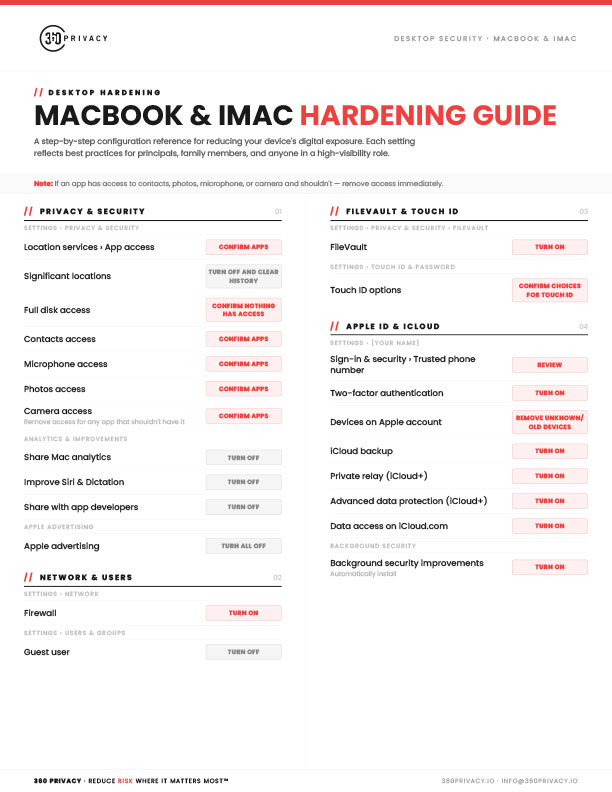
Summary
The 360 Privacy MacBook & iMac Hardening Guide is a free one-page checklist covering the macOS settings that matter most for security and privacy. It starts with privacy controls, including auditing which apps can access your location, contacts, microphone, photos, camera, and full disk, clearing Significant Locations, and turning off Mac analytics and Apple advertising. It then covers turning on the firewall and FileVault disk encryption, disabling the guest user, and reviewing Touch ID options. The Apple ID and iCloud section focuses on two-factor authentication, removing old or unknown devices, iCloud Private Relay, Advanced Data Protection, and automatic background security improvements. Each setting lists a clear action to take for anyone looking to lock down a Mac.
Download the full guide here:
Download GuideShare this
More Resources
Reports
2026 Annual Digital Exposure Report
The people with the most to protect are often the easiest to find.
Guide
iPhone Hardening Guide
A step-by-step configuration reference for reducing your device's digital exposure. Each setting reflects best practices for principals, family members, and anyone in a high-visibility role.
Guide
Android Hardening Guide
A step-by-step configuration reference for reducing your Android device's digital exposure. Each setting reflects best practices for principals, family members, and anyone in a high-visibility role.